AUDIO GEAR AND RECORDING
Just a quick overview of my gear and audio recording process.
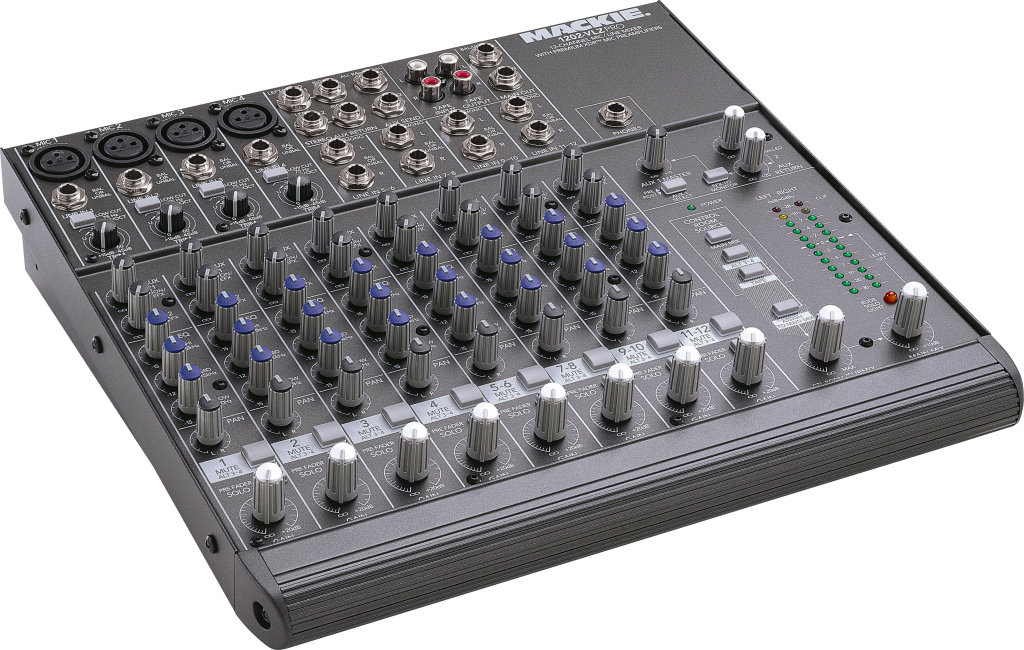
I have an audio mixer, a Mackie 1202VLZPro (Photo) and six microphones:
I typically use one mic for vocals and the other for my acoustic guitar(s). Although, my Martin HD28 has a pickup and I sometimes connect that directly to the mixer for recording.
The stereo outputs of the mixer feed into the line input on my computer's sound card, a Creative Labs Soundblaster Live. Not the best but it gets the job done. I use Sony Sound Forge software to record the analog output of the mixer to the hard disk on my PC. The audio is recorded and saved as a stereo wave (.wav) file. This method produces a stereo recording on the PC. Most times this is all I do, a live recording, and I'm done.
If I'm going to add any other tracks (harmony vocals or other guitars) I import the wave file into Cakewalk Home Studio. There I can adjust the mix, record new tracks, etc. In this case I may, during the original/first recording, just record the guitar track. Then I import that file into Cakewalk and begin to record other tracks using Cakewalk. You could also use Cakewalk to do the very first track.
To hear to the recorded track(s) while laying down a new one (and without suffering feedback) I listen through headphones plugged into the sound card.
Once the final mix is done I can use Sound Forge, Audiograbber, Xing, or MusicMatch to convert the wave file to an mp3 if I want to email it to someone.
guitars
Miscellaneous Audio Recording Info etc.
Musician's Tech Central - Music Equipment, Recording, MIDI, Digital Audio, Indie How-to
Restoring old vinyl records Audio Restoration
the sad tale of Winamp - December 3, 2013
The Winamp media player software was initially released in April of 1997. I've been using it since about 2000 as my main media player.
On November 20, 2013 AOL, the owner of Winamp since 1999, announced that Winamp would be discontinued on December 20, 2013.
You can read more about the history of Winamp at Wikipedia. and at NBC News.
From the Wikipedia article: "Despite AOL's announcement, the Winamp site was not shut down as planned, and on January 14, 2014, it was officially announced that Belgian online radio aggregator Radionomy had bought the Nullsoft brand, which includes Winamp and Shoutcast. No financial details were publicly announced."
The new Winamp site.This page last changed: Thursday, July 30, 2015 - 12:11 PM USA Eastern Time
Copyright Ed Mullen | Contact Ed